Potential customers
Find people in public posts who are looking for, comparing, or ready to buy what you offer.
Every hour BulkCrawl AI reads new public posts from the last 7 days about your keywords, your competitors and your category keywords, and lists the ones whose author may buy soon.
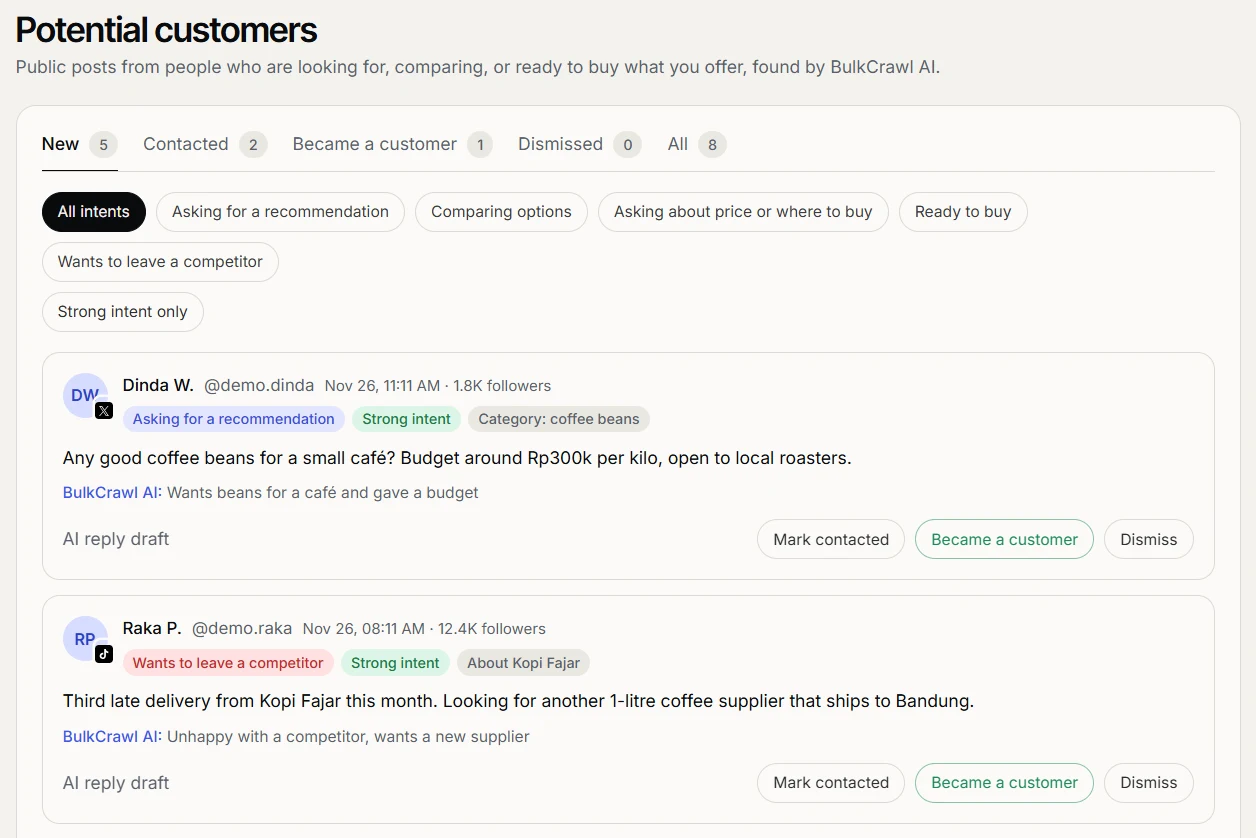
Five kinds of intent
| Intent | Example |
|---|---|
| Asking for a recommendation | "Any good coffee beans for a café?" |
| Comparing options | "Brand A or brand B for a small office?" |
| Asking about price or where to buy | "How much is it, do you ship to Bandung?" |
| Ready to buy | "I want to order 20 for our team." |
| Wants to leave a competitor | "Third late delivery from X, looking for another supplier." |
Asking for a recommendation
Example: "Any good coffee beans for a café?"
Comparing options
Example: "Brand A or brand B for a small office?"
Asking about price or where to buy
Example: "How much is it, do you ship to Bandung?"
Ready to buy
Example: "I want to order 20 for our team."
Wants to leave a competitor
Example: "Third late delivery from X, looking for another supplier."
Each post is marked Strong intent or Some intent, with a short reason. Posts about a competitor show which one.
Category keywords
Many buyers never name a brand: they write "any good coffee beans for a café?". Add short product categories, such as "coffee beans", under Category keywords on the Potential customers page, and choose the platforms to search. How many categories a project can have depends on your plan.
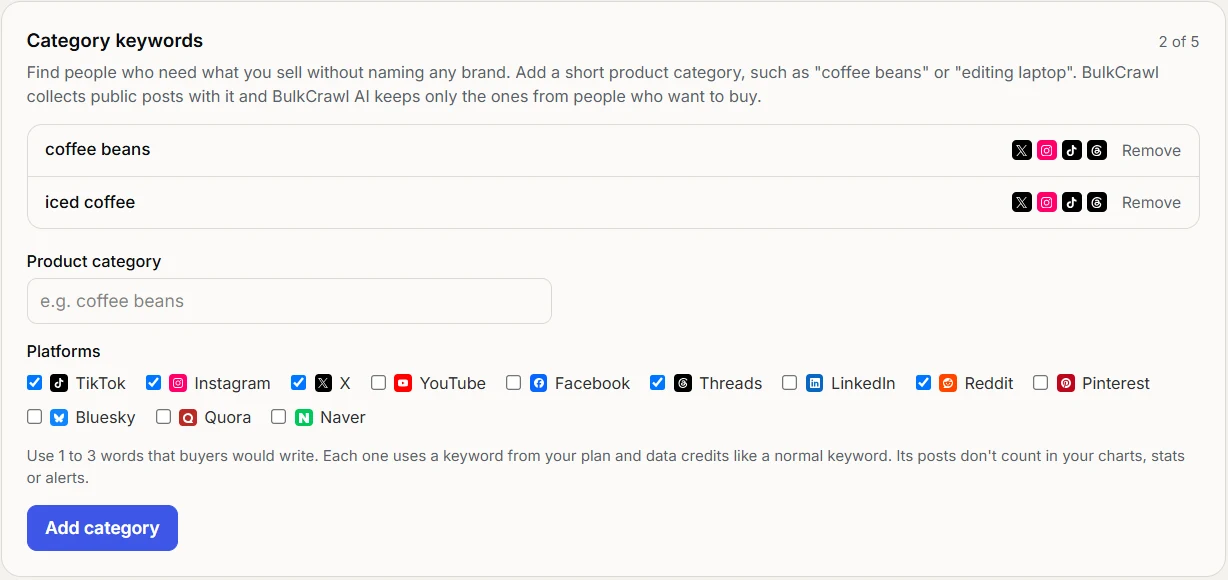
- Posts from the last 7 days are collected as soon as you add one, then on your plan's schedule.
- Each category uses one keyword from your plan and data credits like a normal keyword.
- Their posts never count in your charts, stats, alerts or reports. They are only used to find potential customers, marked Category on each card.
- Use 1 to 3 words buyers would write. A category must appear in the post as written.
What is left out
- Posts by the accounts you track (your own and your competitors' official accounts)
- Sellers, resellers, affiliates, ads and giveaways
- News, and complaints or reviews with no wish to buy or switch
- Posts hidden by the spam & bot cleaning, the relevance filter, or your team
Working the list
- Filter by status (New, Contacted, Became a customer, Dismissed), by intent, or show strong intent only.
- Open the post on its platform, or ask BulkCrawl AI for two reply drafts in the post's language.
- Editors mark each one as contacted, became a customer, or dismissed.
- When new posts with strong intent are found, project members get an in-app notification, and webhooks send the lead.found event.

You decide who to contact
Only public posts are used. BulkCrawl never sends messages or replies for you. The feature is for organization projects, is on by default, and uses your monthly BulkCrawl AI budget. Turn it off in project settings → BulkCrawl AI.
Last updated Nov 26, 2026